MySQL Foreign Keys Tutorial and Examples
Learn MySQL foreign-key syntax, parent-child rules, constraint naming, ON DELETE and ON UPDATE actions, and common troubleshooting steps.
In relational databases, foreign keys are used to define a constrained relationship between two entities. Foreign keys are useful for ensuring data integrity.
What is foreign keys?
Foreign keys are used to refer to other tables relative to the primary key. The foreign key associates the rows of the child table with the rows of the parent table through one or more columns of the child table corresponding to the primary key or unique key value of the parent table.
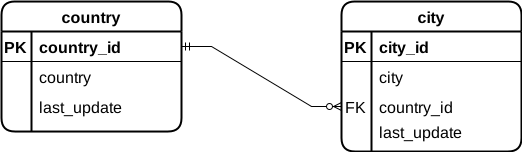
Let’s take a look at the tables country and city from Sakila sample database. Here is their relationship diagram:
Here is some data from the country table:
SELECT *
FROM country
WHERE country_id = 23;
+------------+---------+---------------------+
| country_id | country | last_update         |
+------------+---------+---------------------+
|         23 | China   | 2006-02-15 04:44:00 |
+------------+---------+---------------------+
1 row in set (0.05 sec)
Here is some data from the city table:
SELECT *
FROM city
WHERE country_id = 23;
+---------+---------------+------------+---------------------+
| city_id | city          | country_id | last_update         |
+---------+---------------+------------+---------------------+
|      46 | Baicheng      |         23 | 2006-02-15 04:45:25 |
|      47 | Baiyin        |         23 | 2006-02-15 04:45:25 |
|      80 | Binzhou       |         23 | 2006-02-15 04:45:25 |
|     109 | Changzhou     |         23 | 2006-02-15 04:45:25 |
|     136 | Datong        |         23 | 2006-02-15 04:45:25 |
...
53 rows in set (0.00 sec)
From this we can see that the country table and the city table is a one-to-many relationship. A country can have multiple cities, and a city can only be located in one country.
If a country already has a city, then you cannot easily delete the country from the country table, otherwise it will cause the city data to be incomplete. You also can’t set a non-existent for a city country_id, otherwise the city data will be wrong.
Foreign key constraints ensure that the data is complete and correct.
Foreign Key Syntax
Let’s look at the foreign key constraints defined by the city table:
SHOW CREATE TABLE city\G
*************************** 1\. row ***************************
       Table: city
Create Table: CREATE TABLE `city` (
  `city_id` smallint unsigned NOT NULL AUTO_INCREMENT,
  `city` varchar(50) NOT NULL,
  `country_id` smallint unsigned NOT NULL,
  `last_update` timestamp NOT NULL DEFAULT CURRENT_TIMESTAMP ON UPDATE CURRENT_TIMESTAMP,
  PRIMARY KEY (`city_id`),
  KEY `idx_fk_country_id` (`country_id`),
  CONSTRAINT `fk_city_country` FOREIGN KEY (`country_id`)
    REFERENCES `country` (`country_id`)
    ON DELETE RESTRICT
    ON UPDATE CASCADE
) ENGINE=InnoDB AUTO_INCREMENT=601 DEFAULT CHARSET=utf8mb4 COLLATE=utf8mb4_0900_ai_ci
1 row in set (0.00 sec)
Note some of it:
CONSTRAINT `fk_city_country` FOREIGN KEY (`country_id`)
    REFERENCES `country` (`country_id`)
    ON DELETE RESTRICT
    ON UPDATE CASCADE
A foreign key is defined here:
-
After the
CONSTRAINTkeywordfk_city_countryis the name of the foreign key. It is optional. -
Following the
FOREIGN KEYkeyword is the column name that is the foreign key. -
Following the
REFERENCESkeyword are the referenced tables and columns. -
ON DELETEandON UPDATEspecify the constraint strategy to be taken when deleting or updating data in the referenced table. You can use one of the following 3 strategies:CASCADE: If a row in the referenced table is deleted or updated, the value of the matching row in child table is automatically deleted or updated.SET NULL: If a row in the referenced table is deleted or updated, the value of the matching row in child table is set toNULL.RESTRICT: A MySQL error is raised when attempting to delete or update a row in the referenced table if a row in the referenced table has a matching row in child table. This is the default policy.
Usually, the table to which the foreign key belongs is called the child table, and the table referenced by the foreign key is called the parent table.
Add Foreign Key Syntax
If the foreign key is not defined when the table is created, you can also add the foreign key later by using the following syntax:
ALTER TABLE child_table_name
  ADD CONSTRAINT fk_child_parent
  FOREIGN KEY (child_column)
  REFERENCES parent_table_name (parent_column);
Here:
- Use the
ALTER TABLEstatement to modify the definition of the table. ADD CONSTRAINT fk_child_parentassigns a name to the constraint; theCONSTRAINTname clause is optional.FOREIGN KEY (child_column) REFERENCES parent_table_name (parent_column)links the child column to a candidate key in the parent table. Replace the placeholder table and column names with your schema’s names.
Duplicate foreign key constraint names
An explicit CONSTRAINT symbol must be unique in its schema for that constraint type. If a migration reuses a name already assigned to another foreign key in the same database, check the schema-wide constraint names rather than only inspecting the child table.
SELECT TABLE_NAME, CONSTRAINT_NAME
FROM INFORMATION_SCHEMA.TABLE_CONSTRAINTS
WHERE CONSTRAINT_SCHEMA = 'app_db'
  AND CONSTRAINT_TYPE = 'FOREIGN KEY'
  AND CONSTRAINT_NAME = 'fk_orders_customer';
In MySQL 8.4, the manual describes a duplicate symbol as an error similar to ERROR 1005 (HY000) with errno: 121; some older MySQL versions report Error 1826. Check the complete error and server version. If the name is already in use, choose a different descriptive name or omit the optional symbol so MySQL generates one. When adding a foreign key with ALTER TABLE, use ADD CONSTRAINT name; InnoDB ignores index_name after FOREIGN KEY in that statement. Do not drop an existing constraint just to reuse its name unless removing that relationship is intended.
This is different from Error 1061, which concerns a duplicate index name on one table. Read the MySQL 8.4 foreign-key naming rules for details.
Delete Foreign Key Syntax
To drop a foreign key on a table, one of the following two syntaxes can be used:
-
ALTER TABLE table_name DROP FOREIGN KEY foreign_key_name; -
ALTER TABLE table_name
DROP CONSTRAINT constraint_name;
Here:
- Use the
ALTER TABLEstatement to modify the definition of the table. - Specify the foreign key name after
DROP FOREIGN KEY, that is, the constraint name. - Specify the constraint name after
DROP CONSTRAINT. It can remove any constraint by name, not just foreign keys.
FOREIGN KEY Examples
The following example will create user and user_hobby two tables in the testdb database. Where foreign keys are used in the user_hobby table to reference the user table. Let’s create the user table first, and the user_hobby table will be created according to the respective situation in the following examples. Please follow the steps below:
-
Log in to the MySQL database as the
rootuser:mysql -u root -pEnter the password of the
rootuser.Note: You can also log in as any other user with appropriate database privileges.
-
Select the
testdbdatabase using the following statement:USE testdb;If you haven’t created the database yet, run the following statement first:
CREATE DATABASE testdb; -
Create a table named
user:CREATE TABLE `user` ( `user_id` INT NOT NULL AUTO_INCREMENT, `name` VARCHAR(45) NOT NULL, PRIMARY KEY (`user_id`)); -
Insert two rows in to the user table:
INSERT INTO user (user_id, name)
VALUES (1, "Tim"), (2, "Lucy");
So far, we have created the user table.
CASCADE strategy
If ON DELETE and ON UPDATE use the CASCADE strategy:
- When a row in the parent table is deleted, the matching row in the child table is also deleted.
- When the key value of the row in the parent table is updated, the fields of the matching row in the child table are also updated.
Use the following SQL to create the user_hobby table with a foreign key using the CASCADE strategy.
DROP TABLE IF EXISTS user_hobby;
CREATE TABLE `user_hobby` (
  `hobby_id` INT NOT NULL AUTO_INCREMENT,
  `user_id` INT NOT NULL,
  `hobby` VARCHAR(45) NOT NULL,
  PRIMARY KEY (`hobby_id`),
  CONSTRAINT `fk_user`
    FOREIGN KEY (`user_id`)
    REFERENCES `user` (`user_id`)
    ON DELETE CASCADE
    ON UPDATE CASCADE);
Insert rows into two tables:
DELETE FROM user;
DELETE FROM user_hobby;
INSERT INTO user (user_id, name)
VALUES (1, "Tim");
INSERT INTO user_hobby (hobby_id, user_id, hobby)
VALUES (1, 1, 'Football'), (2, 1, 'Swimming');
At this point the rows in the user_hobby table as following:
+----------+---------+----------+
| hobby_id | user_id | hobby    |
+----------+---------+----------+
|        1 |       1 | Football |
|        2 |       1 | Swimming |
+----------+---------+----------+
Let’s take a look at the associated operation of the child table caused by the UPDATE and DELETE operation on the parent table:
-
UPDATEoperate on the parent tableWe modify the value of the key
user_idin the parent tableuserfrom1to100:UPDATE user SET user_id = 100 WHERE user_id = 1;At this point the rows in the
user_hobbytable:+----------+---------+----------+ | hobby_id | user_id | hobby | +----------+---------+----------+ | 1 | 100 | Football | | 2 | 100 | Swimming | +----------+---------+----------+ 2 rows in set (0.00 sec)We found that the column values of those rows in the table
user_hobbythat matchuser_id = 1inusertable are also modified to100. -
DELETEoperate on the parent tableDELETE FROM user WHERE user_id = 100;At this point the data in the
user_hobbytable:Empty set (0.00 sec)We found that those rows in the
user_hobbytable that matcheduser_id = 100inusertable were deleted.
RESTRICT strategy
If the ON DELETE and ON UPDATE use the RESTRICT strategy:
- MySQL prohibits deletion of rows in parent tables that match child tables.
- MySQL prohibits deleting the value of the key of the row in the parent table that matches the child table.
Use the following SQL to create the user_hobby table with foreign keys using the RESTRICT strategy.
DROP TABLE IF EXISTS user_hobby;
CREATE TABLE `user_hobby` (
  `hobby_id` INT NOT NULL AUTO_INCREMENT,
  `user_id` INT NOT NULL,
  `hobby` VARCHAR(45) NOT NULL,
  PRIMARY KEY (`hobby_id`),
  CONSTRAINT `fk_user`
    FOREIGN KEY (`user_id`)
    REFERENCES `user` (`user_id`)
    ON DELETE RESTRICT
    ON UPDATE RESTRICT);
Insert data into two tables:
DELETE FROM user;
DELETE FROM user_hobby;
INSERT INTO user (user_id, name)
VALUES (1, "Tim");
INSERT INTO user_hobby (hobby_id, user_id, hobby)
VALUES (1, 1, 'Football'), (2, 1, 'Swimming');
At this point the rows in the user_hobby table:
+----------+---------+----------+
| hobby_id | user_id | hobby    |
+----------+---------+----------+
|        1 |       1 | Football |
|        2 |       1 | Swimming |
+----------+---------+----------+
Let’s see the result of the UPDATE and DELETE operation on the parent table:
-
UPDATEoperate on the parent tableUPDATE user SET user_id = 100 WHERE user_id = 1;The MySQL server returned the following error:
ERROR 1451 (23000): Cannot delete or update a parent row: a foreign key constraint fails (`testdb`.`user_hobby`, CONSTRAINT `fk_user` FOREIGN KEY (`user_id`) REFERENCES `user` (`user_id`) ON DELETE RESTRICT ON UPDATE RESTRICT) -
DELETEoperate on the parent tableDELETE FROM user WHERE user_id = 1;The MySQL server returned the following error:
ERROR 1451 (23000): Cannot delete or update a parent row: a foreign key constraint fails (`testdb`.`user_hobby`, CONSTRAINT `fk_user` FOREIGN KEY (`user_id`) REFERENCES `user` (`user_id`) ON DELETE RESTRICT ON UPDATE RESTRICT)
When an INSERT or UPDATE on a child row fails because its parent key is missing, MySQL reports Error 1452. See how to fix MySQL Error 1452.
If MySQL rejects the foreign-key definition while you create or alter a table, see how to fix MySQL Error 1215. That is a schema-definition problem, distinct from Error 1452’s missing parent row.
If a parent row cannot be deleted or updated because child rows still reference it, see how to fix MySQL Error 1451.
MySQL 8.4 can report incompatible child and parent column types as Error 3780. See how to fix MySQL Error 3780 to compare integer widths and signs or string character sets and collations.
If the server reports Error 1822, it cannot find a suitable parent-table index for the referenced columns. See how to fix MySQL Error 1822, including how to check a composite index’s column order.
Error 1821 instead names a missing child-table (foreign-table) index. See how to fix MySQL Error 1821 to verify the child index’s leading columns and order.
SET NULL policy
If the ON DELETE and ON UPDATE use the SET NULL strategy:
- When a row of the parent table is deleted, the value of the column of the matching row in the child table is set to
NULL. - When the key value of a row in the parent table is updated, the column value of the matching row in the child table is set to
NULL.
Use the following SQL to create the user_hobby table with foreign keys using the SET NULL strategy.
DROP TABLE IF EXISTS user_hobby;
CREATE TABLE `user_hobby` (
  `hobby_id` INT NOT NULL AUTO_INCREMENT,
  `user_id` INT,
  `hobby` VARCHAR(45) NOT NULL,
  PRIMARY KEY (`hobby_id`),
  CONSTRAINT `fk_user`
    FOREIGN KEY (`user_id`)
    REFERENCES `user` (`user_id`)
    ON DELETE SET NULL
    ON UPDATE SET NULL);
Insert data into two tables:
DELETE FROM user;
DELETE FROM user_hobby;
INSERT INTO user (user_id, name)
VALUES (1, "Tim");
INSERT INTO user_hobby (hobby_id, user_id, hobby)
VALUES (1, 1, 'Football'), (2, 1, 'Swimming');
Let’s take a look at the associated operation of the child table caused by the UPDATE and DELETE operation on the parent table:
-
UPDATEoperate on the parent tableUPDATE user SET user_id = 100 WHERE user_id = 1;At this point the data in the
user_hobbytable:+----------+---------+----------+ | hobby_id | user_id | hobby | +----------+---------+----------+ | 1 | NULL | Football | | 2 | NULL | Swimming | +----------+---------+----------+ 2 rows in set (0.00 sec)After updated the parent table rows, these rows related in the child table are set to
NULL. -
DELETEoperate on the parent tableSince the above example modifies the data of the table, we reinitialize the data of the two tables:
DELETE FROM user;
DELETE FROM user_hobby;
INSERT INTO user (user_id, name)
VALUES (1, "Tim");
INSERT INTO user_hobby (hobby_id, user_id, hobby)
VALUES (1, 1, 'Football'), (2, 1, 'Swimming');
DELETE FROM user WHERE user_id = 100;At this point the data in the
user_hobbytable:+----------+---------+----------+ | hobby_id | user_id | hobby | +----------+---------+----------+ | 1 | NULL | Football | | 2 | NULL | Swimming | +----------+---------+----------+ 2 rows in set (0.00 sec)After deleted the parent table rows, these rows related in the child table are set to
NULL.
Self-referencing foreign keys
Sometimes, the child table and the parent table may be the same table. A foreign key in such a table is called a self-referential foreign key.
Typically, self-referential foreign keys are defined in tables that represent tree-like data structures. For example, a table representing categories:
CREATE TABLE category (
  category_id INT AUTO_INCREMENT PRIMARY KEY,
  category_name VARCHAR(45),
  parent_category_id INT,
  CONSTRAINT fk_category FOREIGN KEY (parent_category_id)
    REFERENCES category (category_id)
    ON DELETE RESTRICT
    ON UPDATE CASCADE
);
In this table, the parent_category_id column is a foreign key. It references the category_id column of the category table.
This table implements an infinite hierarchy of classification trees. A category can have multiple subcategories, and a subcategory can have 0 or 1 parent category;
Enable or Disable Foreign Key Constraints
To disable foreign key constraints, use the following statement:
SET foreign_key_checks = 0;
To enable foreign key constraints, use the following statement:
SET foreign_key_checks = 1;
Disabling foreign key constraints is useful when bulk importing data.
Conclusion
In this article, we introduced what foreign keys are, the rules for foreign keys, and how to use them in MySQL. Here are the main points of this article:
- Foreign keys are used to define constraints between two entities. Foreign keys are useful for ensuring data integrity.
- The table that defines the foreign key is called the child table, and the table referenced by the foreign key is called the parent table.
- The foreign key refers to the primary key or unique key column of the parent table.
- The
ALTER TABLE ... ADD FOREIGN KEY ...statement can be used to add foreign keys. - The
ALTER TABLE ... DROP FOREIGN KEY ...statement can be used to delete foreign keys. - A self-referential foreign key refers to the table itself. This is used to implements tree-like data structures.